






 Microsoft Copilot

Understanding Microsoft 365 tenant segmentation for better security, compliance and governance


Microsoft 365 tenant segmentation separates users, data and administration inside one Microsoft 365 environment, usually by country, subsidiary or department, so each group of admins and users reaches only the content, apps and services meant for them. It supports data residency, tighter access control and admin roles scoped to a region or subsidiary, without splitting the organization into separate tenants.
As a Microsoft 365 admin or IT pro, you know that the platform offers a variety of services and applications that can increase productivity and simplify workflows for your organization. However, this increased functionality also means that your data is at greater risk. To mitigate that risk and maintain compliance with security and data privacy regulations, it’s crucial to implement Microsoft 365 tenant segmentation.
What is tenant segmentation?
In this blog post, we’ll discuss what tenant segmentation is, why it’s important, and best practices for implementation. So, what is tenant segmentation? Simply put, it’s the practice of separating and securing data within a single Microsoft 365 environment. This ensures that only authorized users have access to specific content, applications, and services.
Tenant segmentation helps protect your organization in several ways:
Data Residency and Compliance
Segmentation helps ensure regulatory compliance by limiting access to sensitive data and protecting customer information.
One of the primary use cases for tenant segmentation is to maintain data compliance with regulations requiring data to reside in specific geographic locations. For instance, companies operating in Europe might need to store their data within the EU to comply with GDPR.
Easier Management
Segmentation enables better data management by allowing admins to apply policies and settings at a more granular level. Now that we understand what tenant segmentation is and why it’s important, let’s talk about best practices for implementation. First and foremost, it’s important to understand your organization’s data and identify what needs to be secured. This can include sensitive information such as financial data or personal customer data. Once that’s identified, you can begin creating policies and assigning appropriate access levels.
Securing Sensitive Information by Restricting Access
In organizations where only certain divisions handle sensitive data, tenant segmentation can be used to separate this data from the rest of the organization. This way, in case of a breach, the sensitive data remains secure. Ensure that data protection settings are applied to all appropriate data sets, such as email, file sharing, and mobile devices.

Group users based on their roles and responsibilities to ensure they only have access to the data and applications necessary to perform their job functions. Segmentation restricts access to data, applications, and services, reducing the risk of unauthorized access or data breaches.
Backup and Disaster Recovery
By segmenting a tenant, organizations can create a disaster recovery plan tailored to each segment’s specific needs, rather than a one-size-fits-all solution.
Controlled Collaboration
Tenant segmentation can provide control over who can share what data with whom. For example, different segments can have different policies for sharing information both internally and externally.
Improved Performance
For global organizations, storing data closer to users’ physical locations can improve Microsoft 365 service performance by reducing latency.
Mergers and Acquisitions
When an organization acquires or merges with another company, it may end up with multiple Microsoft 365 tenants. To streamline operations, they may want to consolidate these tenants into a single tenant while maintaining data segmentation for different departments or regions.
Organization Restructuring
If a large organization is restructured into semi-independent entities, tenant segmentation allows each entity to manage its own segment of the Microsoft 365 tenant.
Prioritize tenant segmentation
Microsoft 365 tenant segmentation is a crucial component of any organization’s security and compliance strategy. By separating and securing data within a single environment, you can better protect sensitive information, reduce the risk of breaches, and manage data more effectively. If you’re an admin or IT pro responsible for Microsoft 365, make tenant segmentation a priority in your organization by following best practices and regularly reviewing your security policies. With the right approach, you can ensure that your organization is better protected against today’s evolving security threats.
Next steps: How can Rencore Governance help?
Rencore Governance governs each Microsoft 365 tenant as its own environment with its own subscription, and admins switch between tenants easily; policies can be standardized across tenants by exporting them from one tenant and importing them into another. Within one tenant, Virtual Environments split your users and objects into scoped segments for more efficient management.

You can select M365 Workloads, which should be included, and which objects and activities should be scanned? You don’t want to have user activities included? No problem!
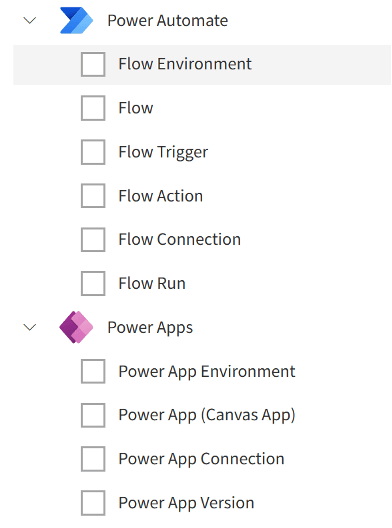
Are certain Workloads from the Power Platform not rolled out yet and shouldn’t be part of Governance Auditing and Monitoring? Just uncheck the boxes:
One major use case of Virtual Environments is to segment a tenant by country, reading out users’ country attributes, stored in Microsoft Entra ID (can also be used to exclude countries, cities, locations, or departments):

Each segment should be easy to recognize. You are considering applying dedicated branding, logos, and colors:

Rencore also allows management of most Microsoft 365 admin tasks from a single GUI and displays all user details, groups, licensing, and M365 Workloads without switching between M365 Admin Centers.
Read more about how Rencore Governance can help your organization, and see for yourself how our tool makes it easy to govern across multiple geolocations.
Last updated 25 September 2026


