



Staying compliant with regulations in an AI driven Microsoft workplace with the help of Microsoft Purview


AI is moving into the Microsoft workplace faster than most compliance programs can document it, and the regulator will not wait for you to catch up. Gartner finds that 71% of enterprises name security and governance among their top challenges to deploying Microsoft 365 Copilot, which is another way of saying that compliance decides whether AI ships at all. So start with the ground rules. How do we define a regulation?
“Regulations are rules or directives made and maintained by an authority, typically a government or regulatory body, to manage and guide behavior within specific sectors of society, industries, or economic activities. They are designed to enforce laws, ensure safety, protect the public, maintain standards, and promote fairness.”
Regulations serve an important purpose. For consumers and organizations. Varying from:
- Safety and health: Ensuring the safety of workers, consumers, and the general public.
- Consumer protection: Preventing fraud, unfair practices, or monopolies.
- Environmental protection: Reducing environmental damage by regulating pollution or the use of natural resources.
- Market fairness: Ensuring businesses operate on a level playing field and promoting competition.
There are three types of regulations:
- Economic: Affect prices, competition, and market entry.
- Social: Focus on health, safety, and environmental protections.
- Administrative: Rules that guide the operation of government agencies and public service delivery.
In Europe we have a series of important regulations (and directives) in relation to our digital workplace. The most famous ones are:
- General Data Protection Regulation (GDPR)
- Network and Information Security Directive (NIS2)
- Digital Operational Resilience Act (DORA)
- Artificial Intelligence (AI) Act
These have their own set of controls, rules and guidelines. For this article, we focus on Data Security. An important side note, and a question we often get, is although Microsoft offers tools, features, and frameworks that assist your organizations in meeting regulatory requirements. Microsoft is not responsible for your compliance with regulation. This is often done by independent auditors. That said, let’s take a look at the features available in Microsoft Purview around regulations. First up, the Microsoft Purview Compliance Manager.
Microsoft Purview Compliance Manager
The Microsoft Purview Compliance Manager is an excellent start in checking in with your compliance status in regards to regulations and directives. The start page immediately provides your organization with valuable insights:
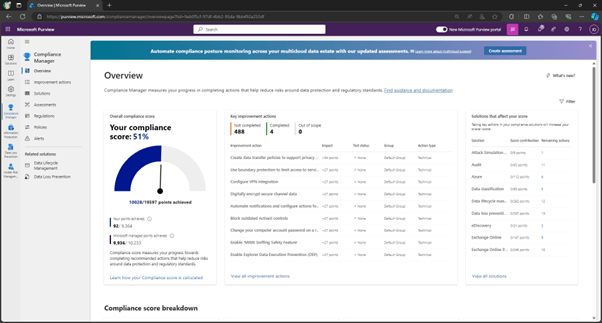
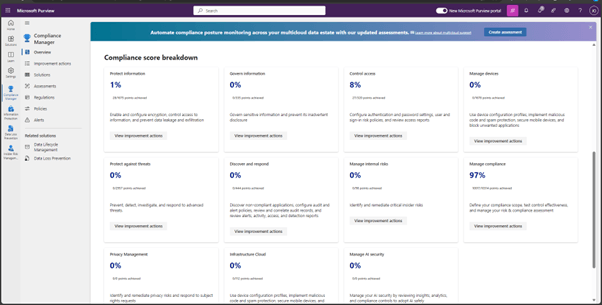
You receive a default Compliance score from Microsoft, based on elements primarily from NIST CSF (National Institute of Standards and Technology Cybersecurity Framework) and ISO (International Organization for Standardization), as well as from FedRAMP (Federal Risk and Authorization Management Program) and GDPR (General Data Protection Regulation of the European Union). The next two sections on the right provide key improvement actions and solutions impacting your score. The bottom of the page provides a breakdown per topic.
Regulatory templates & assessments
Microsoft provides over 360 ready-to-use regulatory templates with the necessary controls and improvement actions for completing the assessment.
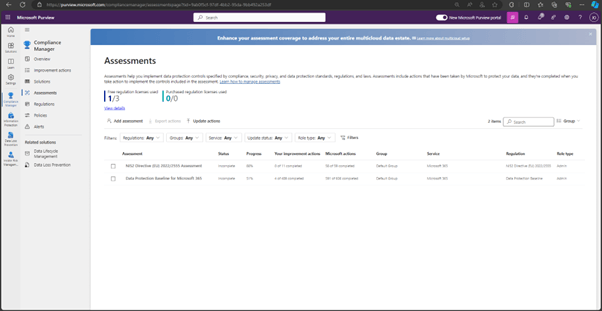
You easily select new assessments through the menu:
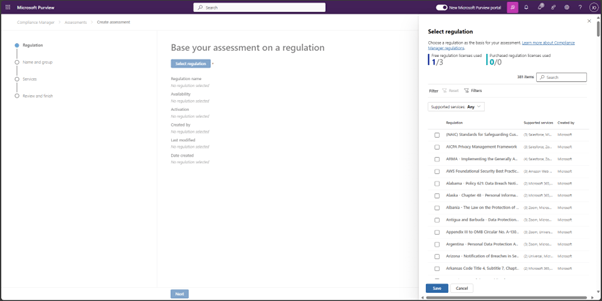
Be aware! You only receive three free assessments. Choose wisely! Click here to learn more about the licensing process of premium assessments.
What assessments are there for AI regulations ? There are, at the moment of writing, four assessments:
- EU Artificial Intelligence Act
- ISO/IEC 23894:2023
- ISO/IEC 42001:2023
- NIST AI Risk Management Framework (RMF) 1.0
Improvement actions
After selecting an assessment, an overview is presented.
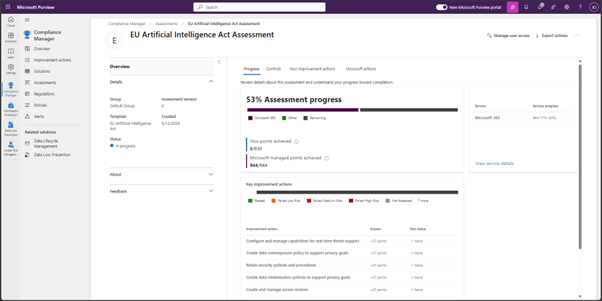
Microsoft managed all their points but you have some work to do! Through the improvement actions tab, you receive instructions on improving your score and taking steps to become compliant to the selected regulation. For example,
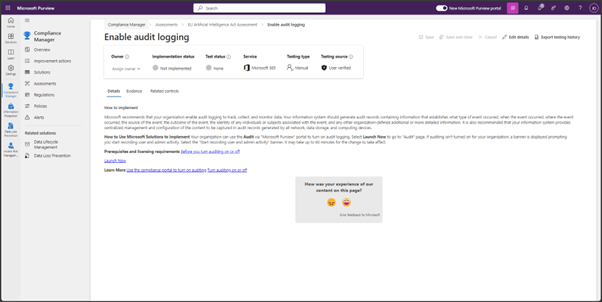
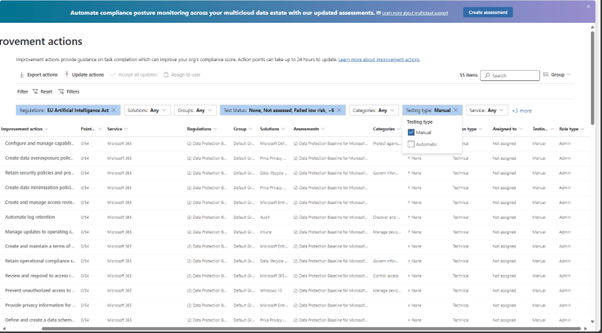
Microsoft provides instructions for implementing the improvement action. You are responsible for testing, providing evidence and accepting. Once this process is done, the score increases. The majority of scores are tested manually, some are automatically. Make sure you check this before you are worried why your score doesn’t increase. You can adjust the filter in the improvement actions to view all manual actions:
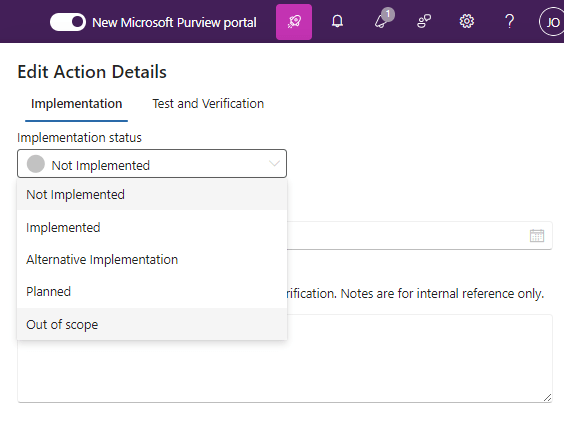
Assessments contain actions that aren’t always applicable for your organization. You have to change the implementation status and set these out of scope:
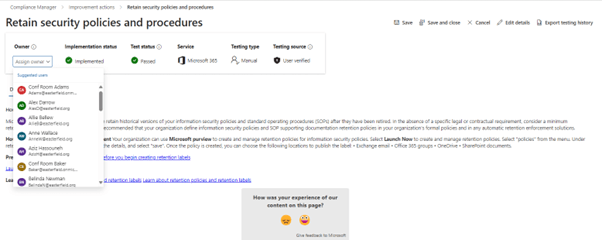
The process of working on the assessment is a cooperation between multiple roles within your organization. We advise to setup a project between your IT security, Microsoft 365 maintenance compliance and risk departments. You assign the owner, responsible for the improvement action, in the top menu:
Roles & permissions
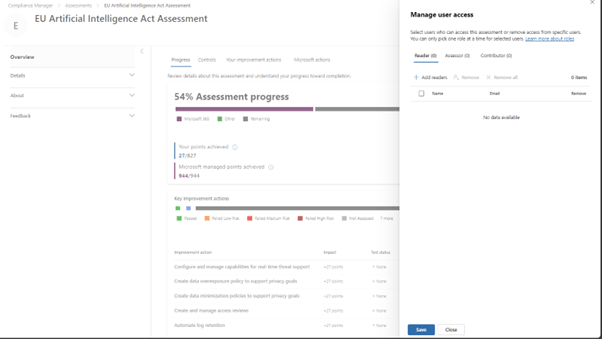
Don’t forget, your colleagues need access to the Microsoft Purview Compliance Manager . To apply the principle of least privilege, Microsoft Purview provides four rules providing access to assessments:
- Compliance Manager Reader
- Compliance Manager Contribution
- Compliance Manager Assessor
- Compliance Manager Administration
You assign your colleagues, to their corresponding roles, in the manage user access menu:
Conclusion
We conclude that regulations are crucial for maintaining order, protecting rights, and ensuring justice within various areas of public life. Each organization has their role to play. Luckily, Microsoft Purview makes lives easier by providing assessment for regulations and guiding your organization towards compliance. Microsoft Purview Compliance Manager is only the beginning of becoming compliant. In future blogs we take a deeper look at other Microsoft Purview features for your compliance adventures.
A note from Rencore
Compliance is the board pillar this ladders to, and Purview is the right place to start. Rencore complements and extends Microsoft Purview rather than replacing it: our Digital Workplace and AI & Agents modules inventory the Teams, sites, flows, and Copilot agents your people actually create, rank them by risk, and produce the evidence an auditor asks for. Purview classifies and protects the data; we govern the services and agents that reach it, so your business users keep collaborating.
Over to you
If you want to better understand Microsoft cloud services and security and dive further into Purview, get your hands on our FREE Microsoft cloud services and security whitepaper by clicking the button below!
Last updated 12 January 2026


