Easily offboard Microsoft 365 users
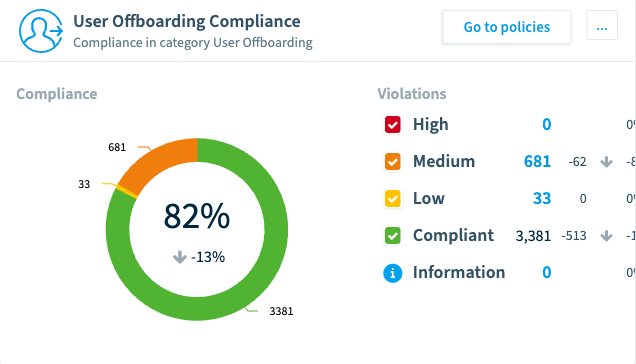
Rencore Governance provides you with maximum flexibility and efficiency in your governance approach for Microsoft 365, Microsoft Teams, SharePoint, OneDrive, Entra ID, Exchange, Viva Engage, and Power Platform. Once connected to your organization’s tenant, the offboarding dashboard gives you an instant overview of any outstanding offboarding tasks. By continuously monitoring your tenant with pre-built checks, offboarding can happen in a matter of minutes.











Leavers leave. Their access, licenses and resources stay.

Access outlives the employee
Disabling the account is one task of many; the Teams, sites and files a leaver owned or could reach stay behind, and so does the risk they carry.

Licenses keep costing money
Disabled accounts with licenses still attached keep billing month after month, and nobody notices until someone goes looking.

Nobody sees the whole checklist
Offboarding spans many services and many stakeholders, and a task missed in one service stays missed until it surfaces as a security question you cannot answer.
Never miss tasks again
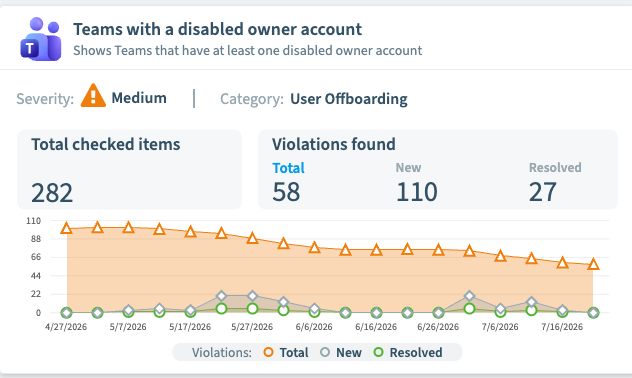
Whenever an employee leaves your company, the offboarding process consists of numerous tasks involving many different services. With Rencore Governance, you define your offboarding policy and easily discover what you might have missed, like disabled user accounts with assigned licenses still attached, still costing you money.

Offboarding with the click of a button
Whenever Rencore Governance discovers missed offboarding tasks, you get notified. Using the built-in automation engine, you can automatically disable external user accounts inactive for more than six months, and reassign the resources of a disabled user to their manager.

Keep everyone in the loop
Offboarding a user involves many stakeholders at once. To keep them all updated, Rencore Governance builds recurring reports on disabled accounts with assigned licenses and offboarding progress, and shares them automatically with everyone involved.
Trusted by security, IT, and platform leaders
Security, IT, and platform leaders use Rencore to see their Microsoft estate, cut cost and risk, and roll out Copilot and agents on a governed foundation.
-

With Rencore's scalable automation solutions, organizations can not only meet current challenges but also prepare themselves for future technological advancements.
Case Study Philipp Widmer Head of Platform Services Universitätsspital Basel
 -

26% vs 3%
Organizations that govern Microsoft 365 well realize significant Copilot value 26% of the time, versus 3% for those that do not.
Gartner, 2025 Microsoft 365 Copilot Survey -

As we continue to expand our cloud capabilities, the foundation laid by Rencore Governance will undoubtedly play a crucial role in ensuring that each step forward is taken with confidence, security, and compliance in mind.
Case Study Claude Bisdorff Head of IT Systems Ville de Luxembourg
 -

116%
ROI from Microsoft 365 Copilot once the program is adopted and governed, in Forrester’s Total Economic Impact study.
Forrester Total Economic Impact -

I currently estimate that we save around €80k per year by freeing up our IT admin team to do the work that counts.
Case Study Undisclosed Former Lead O365 Competence Center Royal BAM
 -
71%
of enterprises name security and governance among their top challenges to deploying Microsoft 365 Copilot.
Gartner -
Rencore's centralized governance tool excelled at ensuring secure data in Microsoft 365 and minimizing the risk of unauthorized access.
Case Study
-
150,000+
AI agents in use at the average Fortune 500 company by 2028. Agent sprawl is the next sprawl.
Gartner -

With Rencore Governance we are able to reduce manual governance activities, improve our service quality and generate valuable insights across our Microsoft service stack.
Undisclosed Head of AI & Process Automation Wacker Chemie AG


User offboarding FAQs
What does offboarding a Microsoft 365 user actually involve?
More than disabling the account. Licenses need reassigning, owned resources need a new owner, and access across services needs removing. Rencore Governance lists every resource related to a departing user, so no task is missed.
How do I find offboarding tasks that were missed?
You define your offboarding policy in Rencore Governance and it continuously monitors your tenant against it. Whenever it discovers a missed task, such as a disabled account with licenses still attached, you get notified.
Can offboarding steps run automatically?
Yes. The built-in automation engine can, for example, disable external user accounts inactive for more than six months and reassign the resources of a disabled user to their manager.
What happens to the licenses of departed users?
Rencore flags disabled user accounts that still hold license assignments and reports on licenses held by inactive users, so paid seats stop quietly costing money and can be reassigned.
How do the stakeholders involved stay informed?
Rencore Governance builds recurring reports on offboarding progress, including disabled accounts with assigned licenses, and shares them automatically with everyone involved.