.png)


Microsoft Teams continues to evolve and improve to optimize collaboration and communication within teams. The latest update introduces an all-new chat and channel experience to help users work more efficiently and stay more organized. In this blog, I'll discuss the most important updates, what they mean for end users, the benefits those updates offer, and why adoption is essential.
Key Updates
 The new chat and channel experience brings chats, teams, and channels together in a single central place, eliminating the need to switch between contexts. And let's be honest, no one likes having to switch all the time.
With custom sections, persistent filters, and other tools, you can stay organized and work in the way that works best for you. When you start the new experience, you'll get a welcome message with options to start right away or be reminded later. But why wait?
What does this mean for end users?
For end users, this update means a more streamlined and integrated experience. This allows you to manage all your collaboration activities — chats, channels, or meeting chats — in one central place.
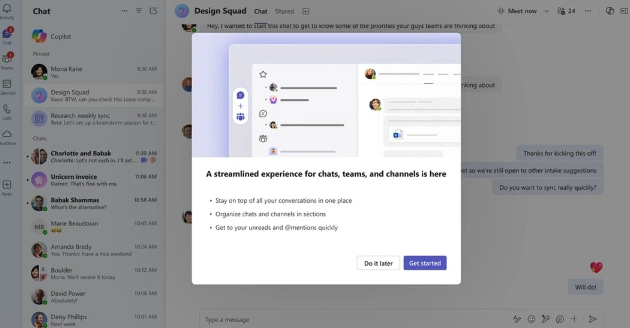
This makes it easier to stay on top of all conversations without constantly switching between apps or screens. I think this will allow us to be much more efficient. Plus, you can customize the view to suit your unique way of working, for example, by viewing chats and channels separately or enabling message previews.
Benefits of the new experience
Efficiency: Having everything in one place saves you time and allows you to respond even faster to important messages.
Organization: Custom sections let you bring together conversations about projects or topics that matter to you, helping you stay more organized.
Accessibility: Whether you are working on your desktop or in a mobile app, the new filters and @mention view help you quickly focus on what's important to you.
Customizability: Everyone works in a unique way. With new customization options, you can tailor Teams chat and channels to your workflows and needs.
Why Adoption is Essential!!
Adopting these new features is crucial to fully leveraging the enhanced collaboration and communication that Microsoft Teams offers. By embracing the new chat and channel experience, teams can work more efficiently, stay more organized, and respond faster to important conversations. Always keep in mind that a change in the way of working is a change for the end user. They will have to be able to adopt such changes. This ultimately leads to a more productive and connected work environment. You can find more adoption-related information on adoption.microsoft.com.
Wrap Up
This is a major update for end users, bringing many new features that could significantly improve the user experience. From my perspective, I still have to get used to the new look and feel. As an experienced user of the platform, it doesn't take much adjustment for me, but I can imagine that for many Microsoft Teams users, this change might feel like a big shift. It may take time for them to fully get accustomed to the new design and workflow changes, but with proper guidance (adoption), this new experience should ultimately prove beneficial.
I'm curious to know what you think of these changes!
A word from Rencore
Microsoft Teams is the go-to tool for many organizations for cloud collaboration. However, like many cloud-based collaboration services, it is prone to clutter and sprawl if not managed closely. A solid Microsoft Teams governance approach will help your organization keep Teams lean and easy to navigate. This holds especially true now that Microsoft Teams combines channels and chats, potentially adding to an already cluttered structure.
Rencore Governance identifies unused, abandoned, and orphaned channels, groups, and chats, and automatically removes unnecessary resources. The tool also automates approval processes when provisioning new resources, automatically applying policies.

.png?width=30&height=30&name=Rene%20Vlieger%20(1).png)