



In my previous article on Governing the Power Platform, starting with the Admin Center, I touched on the concept of a Center of Excellence for the Power Platform.
What is a Center of Excellence (CoE)?
In this concept, Microsoft explains that a Center of Excellence (CoE) in an organization “drives innovation and improvement and brings together like-minded people with similar business goals to share knowledge and success, while at the same time providing standards, consistency, and governance to the organization”.
With this in mind, the Microsoft Community has shared the Microsoft Power Platform CoE Starter Kit. This is a collection of components and tools designed to help you get started developing a strategy for adopting and supporting the Microsoft Power Platform, with a focus on Power Apps, Power Automate, and Power Virtual Agents.
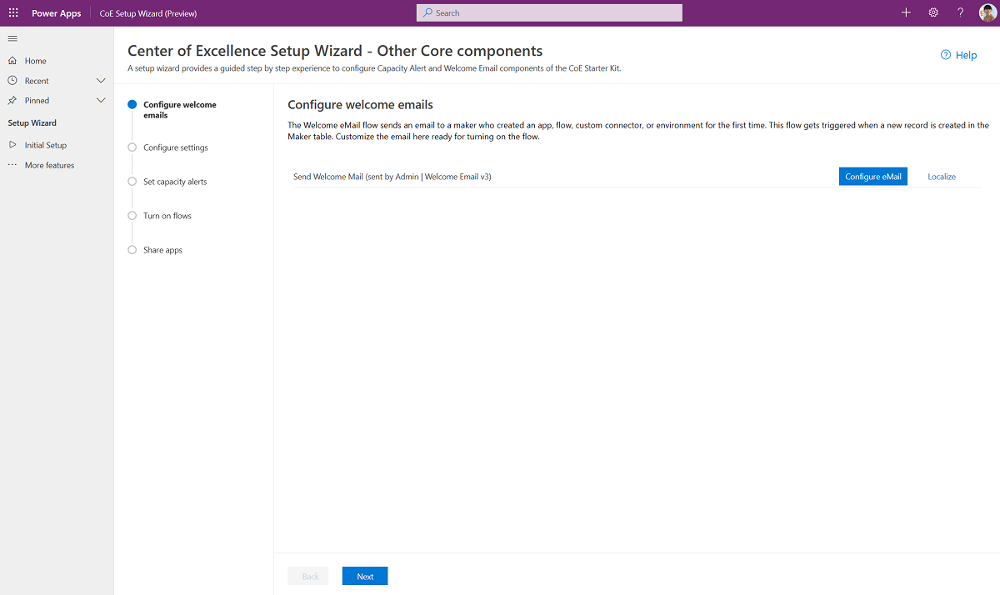
It has already been 3 years since the first release, and every few months, quite some enhancements are made. With every enhancement, the number of components in this kit grows, or its functionality improves. More details on each component can be found in the CoE Starter Kit explained: building blocks and add-ons – Power Platform | Microsoft Learn. It has even reached a version where a simple click-through wizard will guide you through the installation:
How to get the most out of Power Platform with CoE
As someone who has frequently installed the CoE Starter Kit in the last few years, I can say that this wizard has minimized the effort and time required to install the components you want. I really recommend following this GitHub repository to stay up to date. Also, as an extra effort, it could be useful to follow some of the individual contributors on this repo.
The CoE Starter Kit relies heavily on Power Automate Flows to retrieve all Power Platform data daily. That is why, recently, another data collection option has started to emerge in the experimental stage, where you can use Azure Data Lake Storage combined with the Data Export (preview) feature of the Power Platform Admin Center. Please see this resource on what would benefit your scenario the most.
In general, it is wise to update the CoE Starter Kit every 6 months to stay up to date and enjoy the latest releases. More information about updating and extending can be found at these links.
As mentioned before, the CoE Starter Kit is not to be confused with the concept of a Center of Excellence. The concept of a Center of Excellence means “investing in and nurturing organic growth while maintaining governance and control. A CoE is designed to drive innovation and improvement, and as a central function, it can break down geographic and organizational silos”. The CoE Starter Kit is a very useful tool in achieving a Center of Excellence, but the tool itself can never be the end goal. With the installation of the CoE Starter Kit, the journey of setting up a Center of Excellence is only just beginning…
It will provide amazing insights on usage, adoption, and continuous improvement through the Power BI Report that can be deployed to a workspace with just a few clicks:
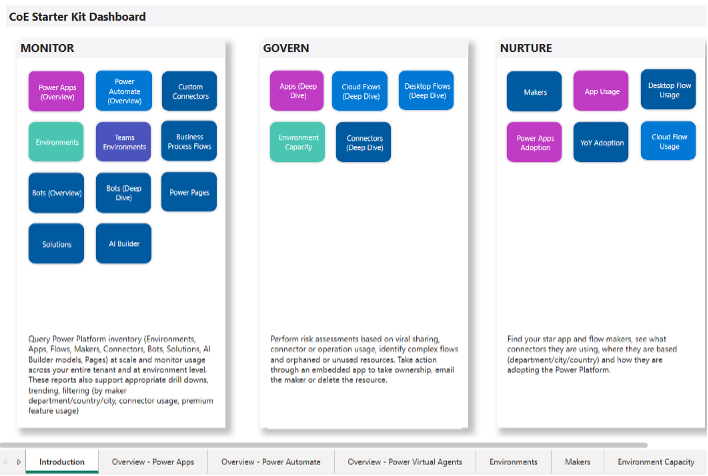
The Power BI Report is broken down into three focus areas:
- Monitor – covering an oversight of tenant resources
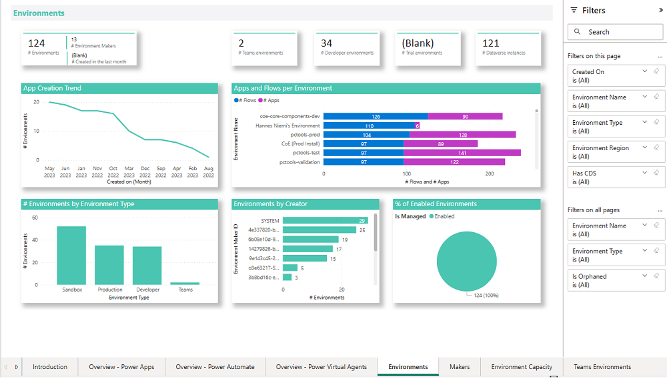
(Environments, Apps, Flows, Bots, AI Builder models, Power Pages, Solutions, and Makers)
- Govern – supporting an organization to drive actions through insights
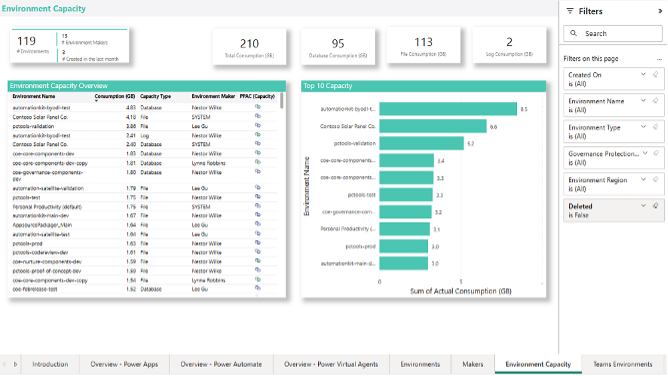
(deep dive details on the items mentioned in the Monitor area)
- Nurture – enabling an organization to learn about its own community
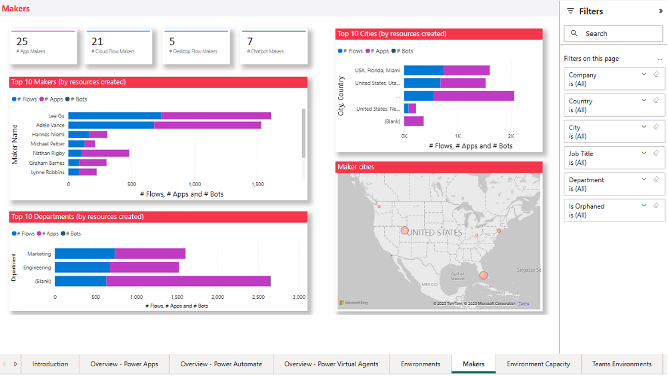
(more maker, user, and usage details on all previous areas)
A separate dashboard can be deployed to cover basic parts of Compliance and Adoption with the CoE Power BI dashboard – Power Platform | Microsoft Learn.
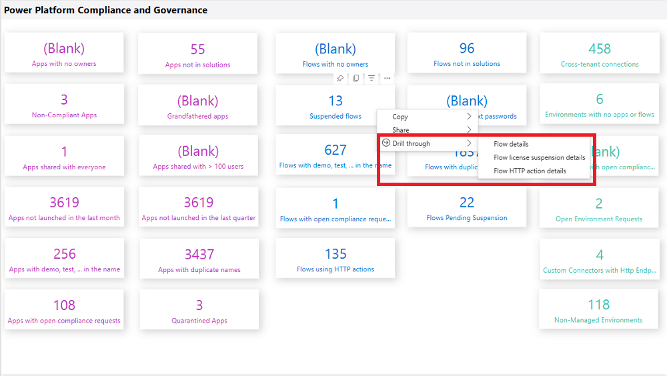
However, an organization still has to do something with these insights. The effectiveness of how an organization uses these insights should be the benchmark for how well your Center of Excellence is performing.
Combine this with the automation capabilities of Rencore's Power Platform Governance solution, leveraging key parts of Power Apps and Power Automate, to extend these insights and simplify compliance efforts across the entire Microsoft 365 environment.
A note from Rencore
As of May 2026, the Microsoft Power Platform Center of Excellence (CoE) Starter Kit is no longer actively maintained and no longer receives new features. While existing installations still work, Microsoft has shifted focus, encouraging users to adopt native governance and inventory capabilities directly within the Power Platform admin center.
Implications for organizations
- The CoE Starter Kit is effectively deprecated, with no new features planned. It remains available, but Microsoft no longer reviews or addresses bugs and recommends using the native Power Platform admin center for management.
- Core CoE functionalities, such as inventory management, app/flow oversight, and adoption tracking, are now integrated into the Power Platform admin center.
- Issues are generally not addressed, though critical security vulnerabilities should still be reported via Microsoft Security Response Center.
- The GitHub integration used in the ALM Accelerator for Makers is being phased out in favor of the ALM Accelerator for Power Platform, though the former remains available for reference.
Organizations currently using the CoE Starter Kit should evaluate Microsoft's Power Platform admin center inventory features or, if and when more than basic functionality is needed, third-party tools like Rencore Power Platform Governance.
For more information on administering the Power Platform, head over to our whitepaper titled "Microsoft Power Platform governance best practices". This whitepaper offers best practices for implementing an effective Power Platform governance strategy that helps increase productivity, reduce operational costs, and reduce the hassle of managing power users.


.png?width=352&name=COE%20Q%26A%20Blog%20Hero%20(1).png)