



There is a lot of talk about AI Agents, but what actually is an AI Agent? According to the official Microsoft documentation, an agent is:
A powerful AI companion that can handle a range of interactions and tasks. It can resolve issues that require complex conversations and autonomously determine the best course of action based on its instructions and context. It coordinates language models, along with instructions, context, knowledge sources, topics, tools, inputs, and triggers to accomplish your goals.
This contains a lot of buzzwords in only a couple of sentences! AI Agents sounds as a great asset for any organization. Improving process efficiency and increasing your productivity. Sounds perfect, right?
Yes, but there are huge risks. Especially around the use and processing of sensitive information by AI Agents. Last November, Microsoft announced a new service called Agent 365. Positioned as a control plan for deploying, organizing, and governing AI Agents within organizations. Agent 365 is still in preview (as of March 2026) and is a work in progress. Let’s take a closer look at what’s available right now and how it can benefit your organization. We are using the results of one of our customers.
Agent overview
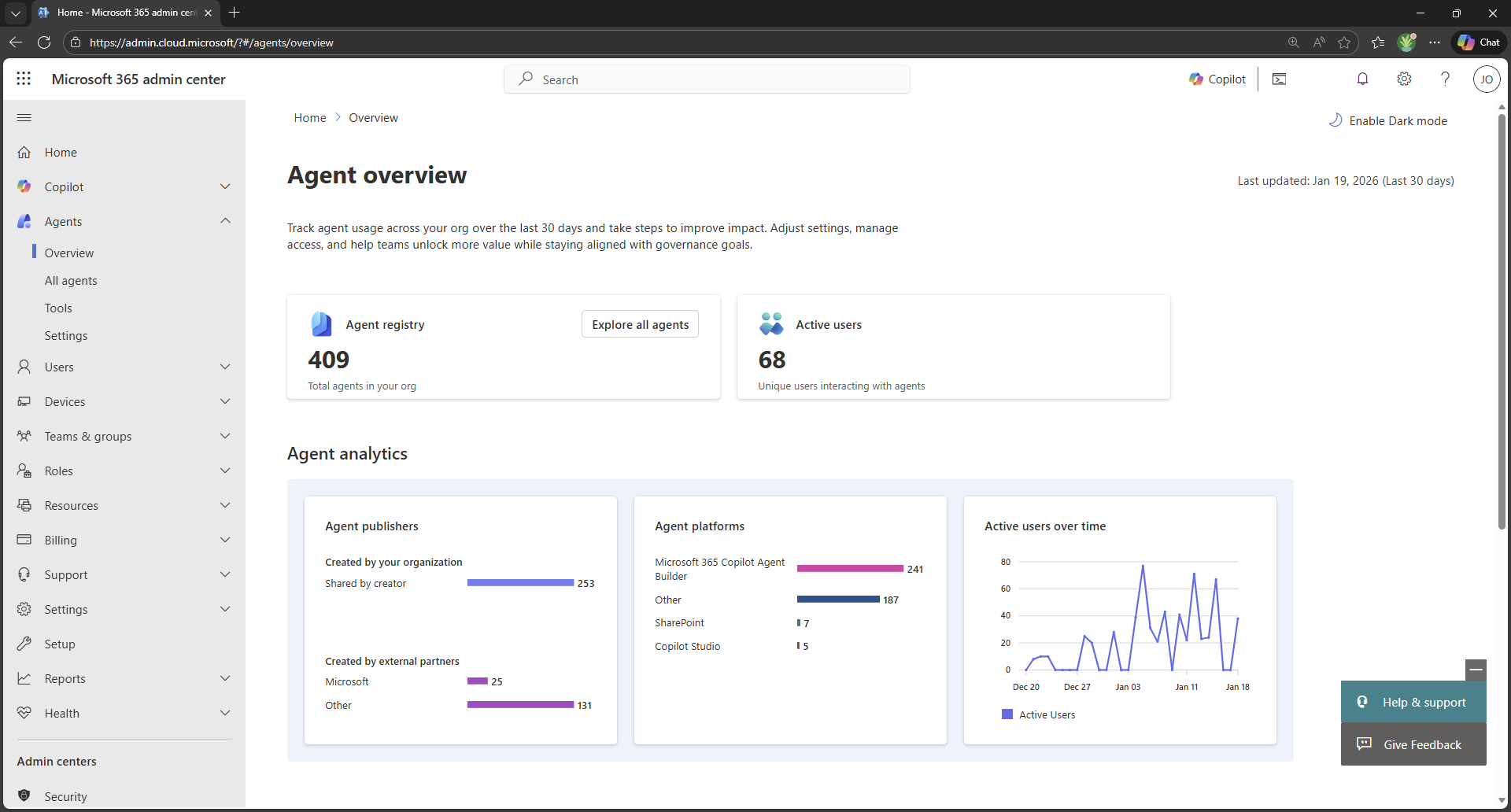
The Agent overview provides valuable insights into the following items and activities:
• Total agents
• Active users interacting with agents
• Agent analytics
• Top actions for you (the admin)
The number of AI Agents, in our example, 409, sounds scary, but comes with an important side note. A lot of Agents are actually Microsoft Teams Apps, now also available as AI Agents. Microsoft also enables multiple out-of-the-box Agents with Copilot. Last but not least, your colleagues (with a Copilot Studio User License) create their own Agents. We recommend starting with taking action on Ownerless Agents.
Taking action: Ownerless Agents
The Agent 365 overview page displays ownerless Agents. For example,
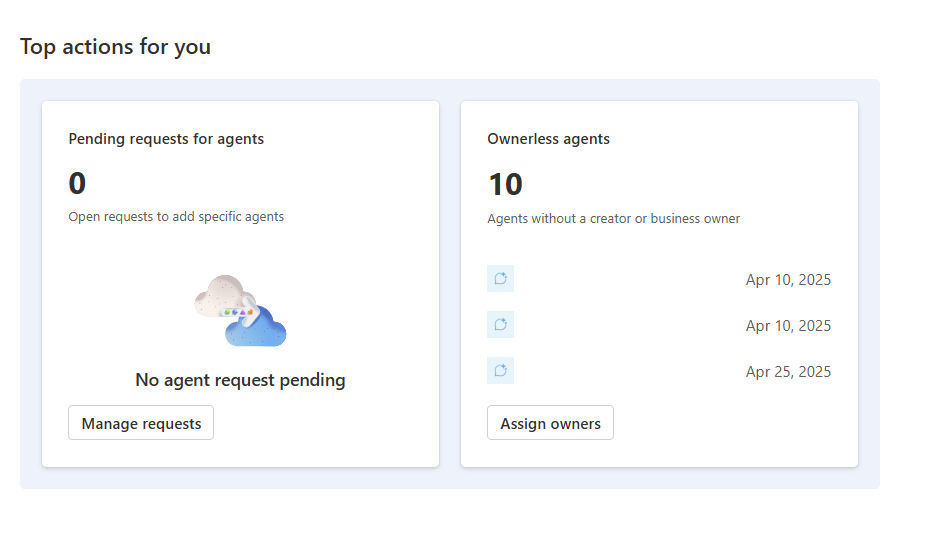 After clicking on assign owners button, the Agents without an owner are displayed. For example,
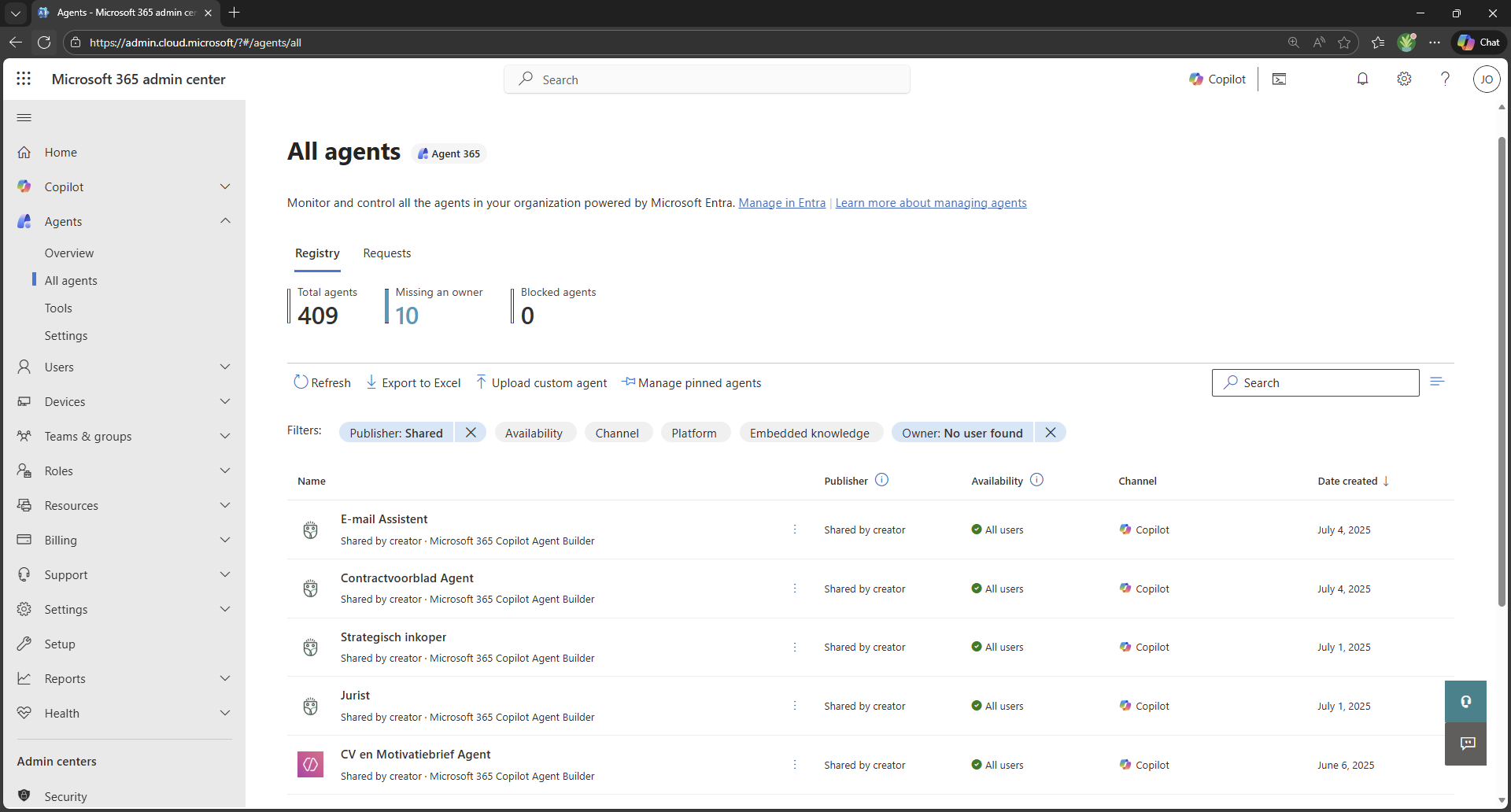
We found ten agents without an owner. In this scenario, we don’t need to worry because the customer hasn’t deployed any Agents. More about this later. These results allow the IT admin to immediately take action by viewing each ownerless Agent.
Overview of our Agent
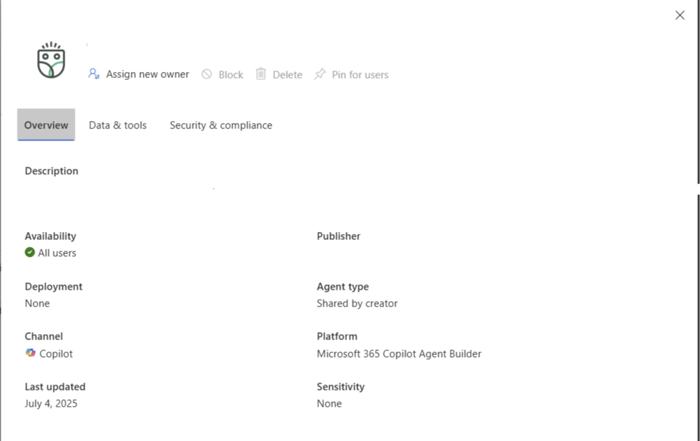
The overview tab provides basic information about the Agent. There are a couple of fields that stand out: availability, deployment, publisher (hidden in our example), and sensitivity.
It seems the Agent is available for all users! No need to worry, the Agent isn’t deployed, so it is only available to the publisher of the Agent. Hopefully, in a future iteration, IT admins can start the app deployment process from this menu. The Agent doesn’t have a sensitivity label attached. Currently, the UI does not support assigning a label to an Agent.
Data & tools
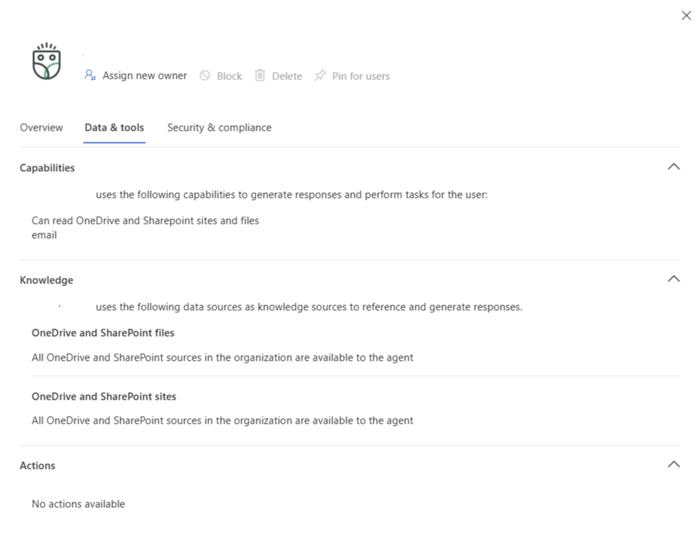 The information is directly pulled from the Agent's creation process by the Agent's publisher. We recommend contacting them for any specific questions. Their name is displayed on the overview page.
Security & Compliance
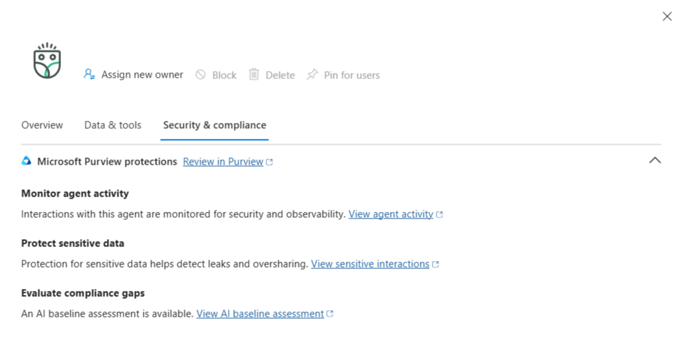 We can clearly see some of the current limitations within Agent 365. We need to browse to Microsoft Purview to view all additional information. There is no connection with the current Agent and the menus that open in Purview.
In a future release, Microsoft really needs to integrate this within Agent 365. There is nothing more annoying than opening multiple tabs and solutions. We need one integrated solution & dashboard. For now, let’s take a look at Microsoft Purview.
Monitor Agent Activity
We view the Agent activity in the Activity Explorer within DSPM. Be aware, this is still in preview. For example:
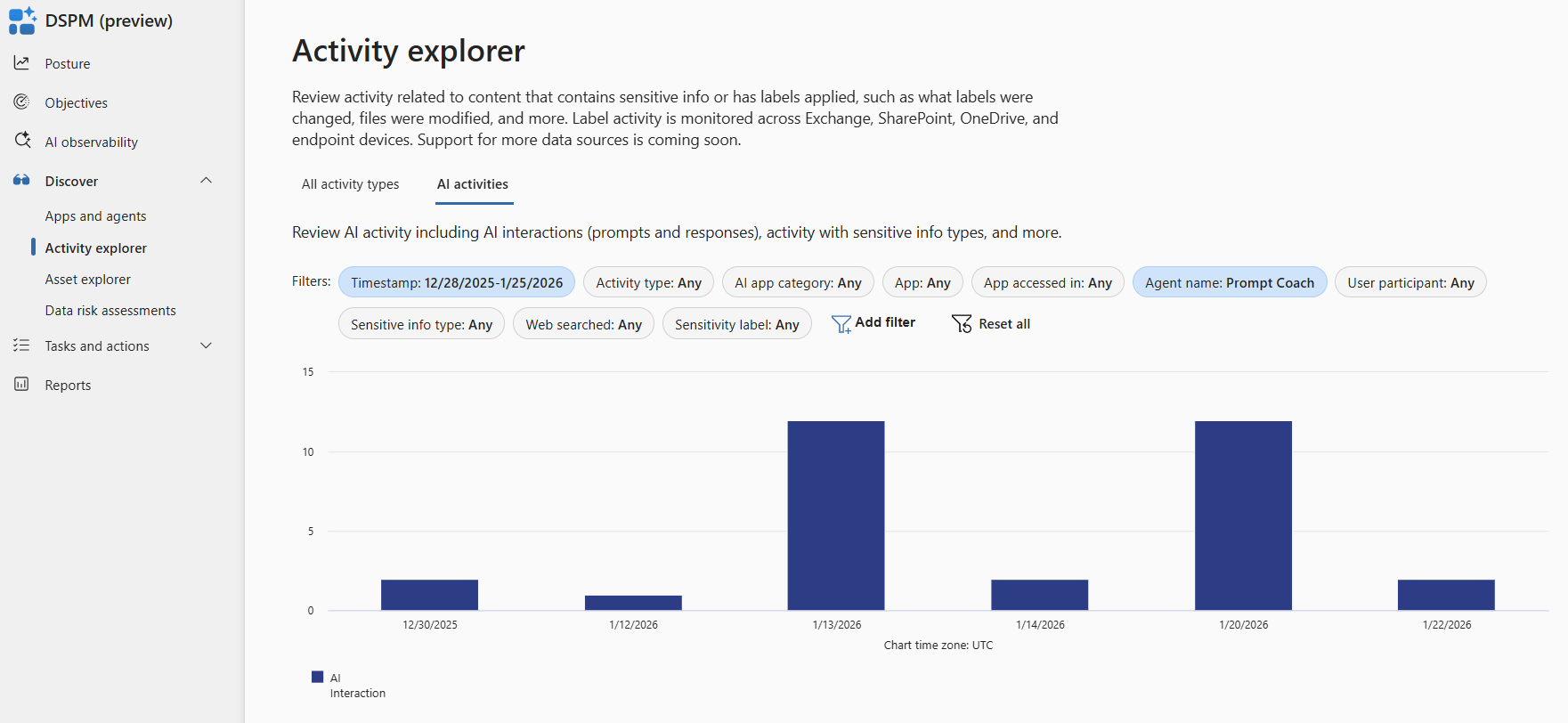
We select the agent we are investigating.
This information isn’t really helpful because we want to see the interactions the user has with the Agent. For example,
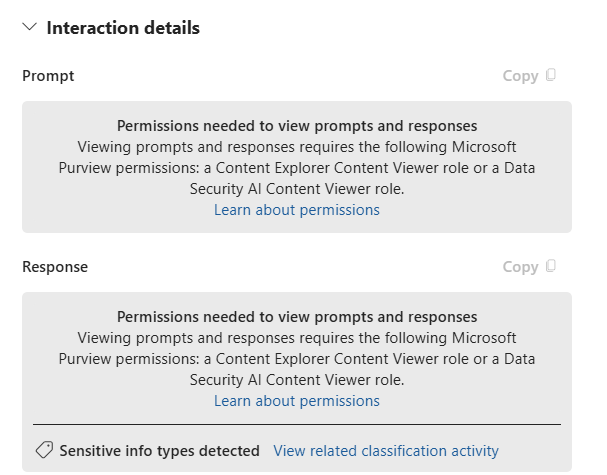
We need additional permissions to view the prompt and results. We need to discuss this with HR and Compliance because it can contain highly sensitive and private information.
Protect sensitive data
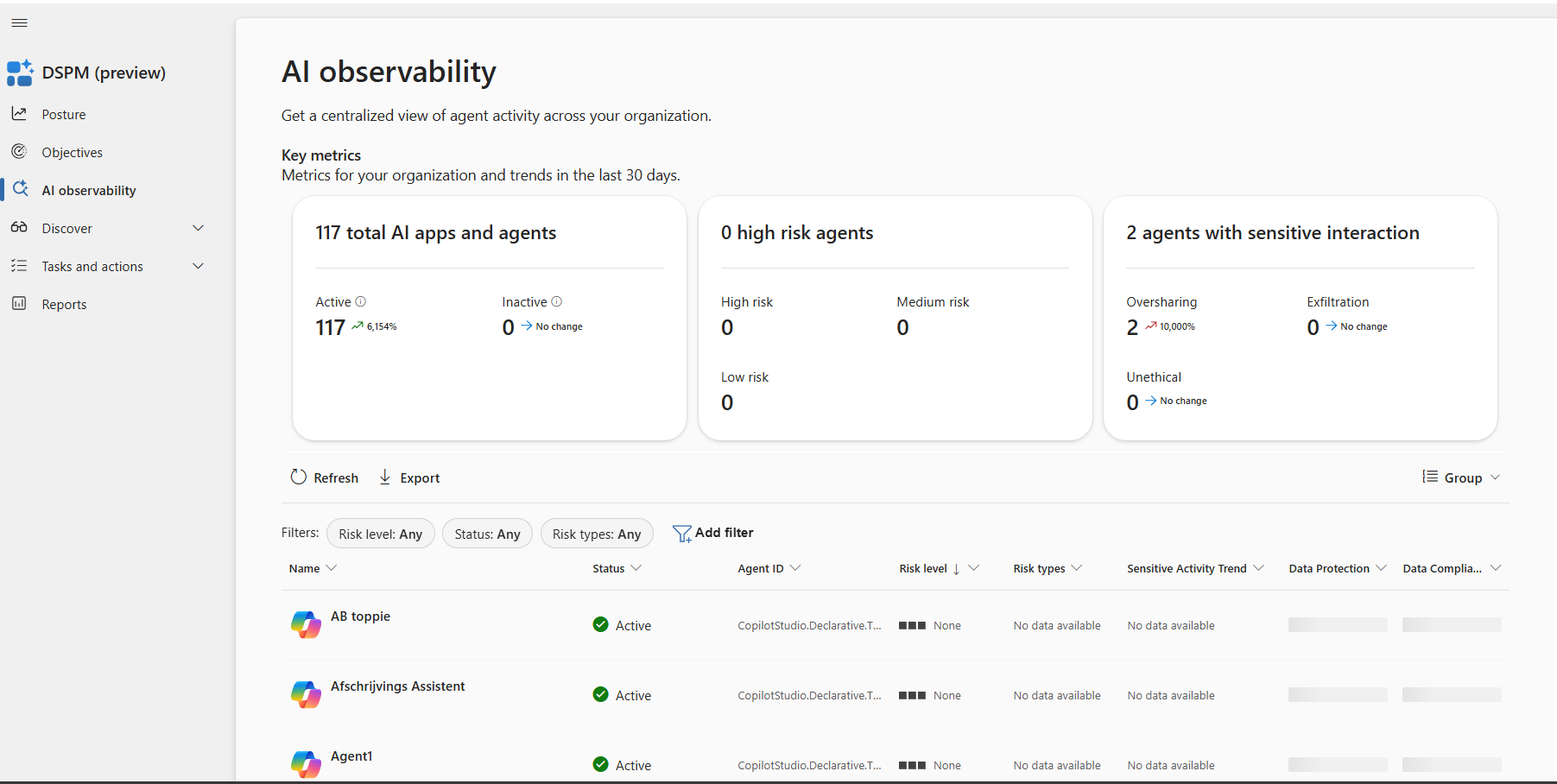
This is where stuff starts to get confusing. That’s because this is still in preview, and Microsoft doesn't provide much documentation.
AI observability shows all Agents in your organization. Not only Microsoft 365. The goal is to showcase high risk Agents with specific risk types. For example, oversharing:
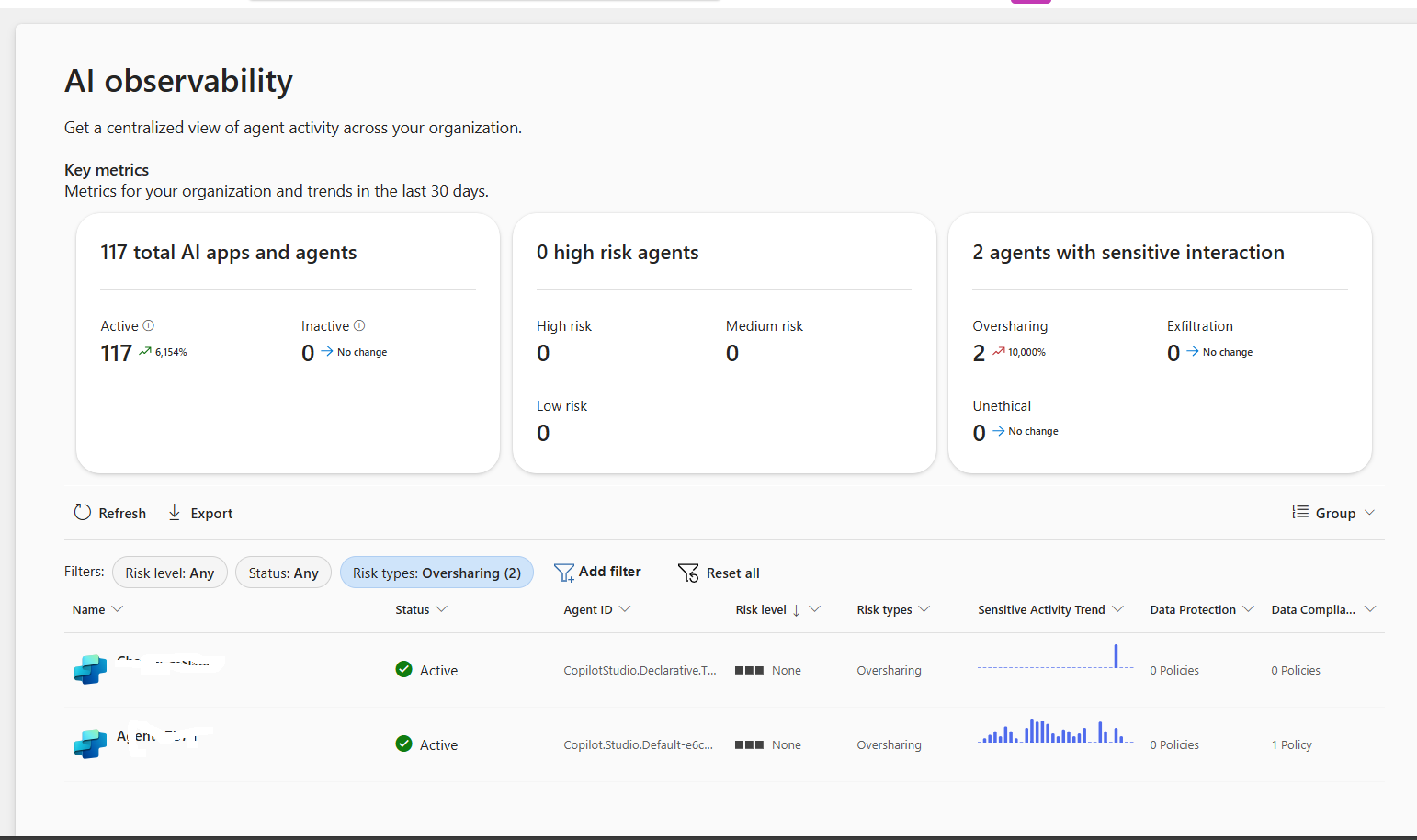
Each Agent provides a selection of recommendations. For example,
.png?width=1502&height=901&name=Screenshot%202026-02-01%20155521%20(1).png)
We appreciate all this information, but for most IT administrators, let alone those in less-technical roles, it is a lot to take in. For all of this to work, organizations need to execute a series of tasks:
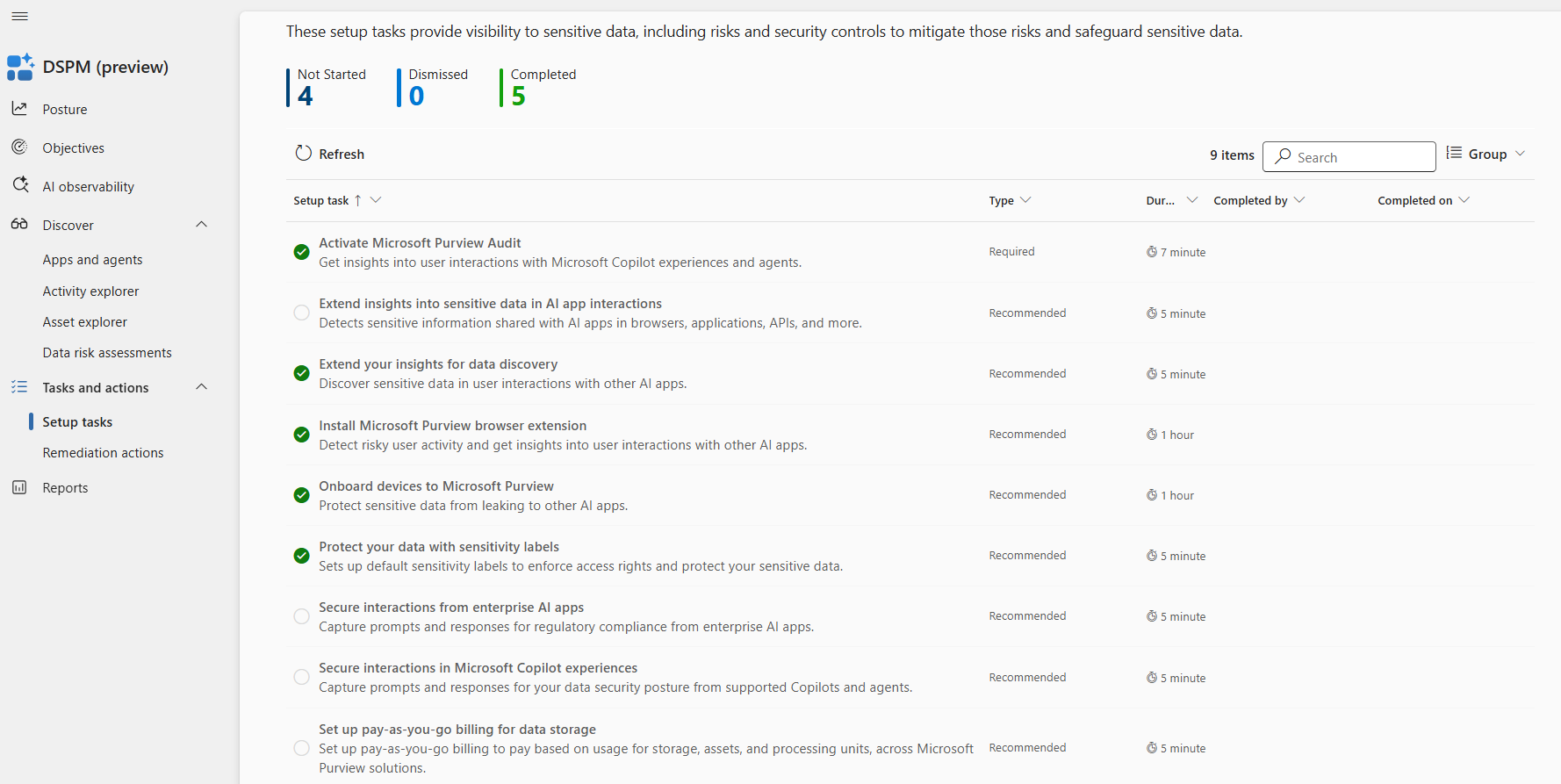
This isn’t easy for most organizations. Not only due to the impact and time required to execute, but also due to the pay-as-you-go construction Microsoft enforced for specific monitoring and protection solutions within Microsoft Purview.
Evaluate compliance gaps
The Compliance Manager contains a new AI Baseline Assessment. Providing a selection of Controls and Improved Actions for improving your AI Compliance based on the following regulations:
• EU Artificial Intelligence Act
• ISO/IEC 23894:2023
• ISO/IEC 42001:2023
• NIST AI Risk Management Framework (RMF) 1.0
The Compliance Manager is incredibly helpful but requires technical expertise to analyze and implement improvement actions. Be aware: These are guidelines. Microsoft can’t make your organization Compliant; you need an independent auditor for this.
Other settings
Agent 365 contains two more menus. The tools menu manages the Model Context Protocol (MCP) servers and other tooling resources that give AI agents their action capabilities. The Agent settings provide more control over allowed agent types, sharing settings, templates, and user access.
Conclusion
Agent 365 provides a centralized overview of all the Agents within your organization. This is a great first step to gain valuable insights.
The current version of Agent 365 isn’t helpful for sensitive information being used within Agents. This is where Microsoft Purview steps in. Microsoft made significant updates to Purview to better manage and protect your sensitive information. Especially around the use of AI and Agents.
Beyond Agent 365
Agent 365 is an important step toward organizing and governing AI Agents, but it still leaves organizations without the day‑to‑day operational control needed to safely run AI at scale. Rencore Governance fills these gaps by extending visibility far beyond Agents into the entire Microsoft 365 environment, connecting the dots between content, permissions, sharing settings, and the systems that AI Agents rely on.
Where Agent 365 focuses on insight, Rencore adds action. It not only identifies risks and misconfigurations but also automates remediation, routes tasks to owners, and enforces rules consistently. This creates a complete governance loop rather than another dashboard of issues to interpret.
Rencore also provides deeper intelligence around sensitivity labels, access exposure, external sharing, and high‑risk data paths. This allows organizations to understand whether AI Agents are interacting with information they should not have access to, something Agent 365 and Purview currently surface only in fragments.
Finally, Rencore's Copilot and Agent governance solution brings structure and hygiene to the wider Microsoft 365 estate by cleaning up unused workspaces, reducing sprawl, and maintaining a secure baseline.
With clear prioritization, role‑specific dashboards, and workflows that business users can understand, Rencore makes responsible AI adoption manageable for IT, security, compliance, and the business alike.
.png?width=352&name=Hero_banner_How%20to%20Control%20Agent%20Sprawl%20in%20Microsoft%20365%20(1).png)