



Power Automate puts automation in the hands of every employee. That is genuinely useful. But the same feature that makes it so easy to adopt is the one that keeps IT admins up at night: users can build and run Power Automate cloud flows connecting internal and external services without IT ever knowing.
Admins can see that a flow makes an HTTP call, but not where it goes. They can see a flow connects to a database, but not which one. They have no way to tell whether credentials are stored in plain text inside a shared flow.
This article covers the specific risks ungoverned Power Automate adoption creates, what built-in admin tools actually let you control, and six Power Automate governance best practices your team can act on today.
Key takeaways:
- Ungoverned HTTP calls, unknown data destinations, and orphaned flows are the top Power Automate security risks.
- DLP policies are the primary native control, but they leave significant visibility gaps.
- Ungoverned flows writing to SharePoint are a direct risk to Copilot response accuracy.
- Full flow visibility, ownership control, and cost monitoring are the pillars of effective Power Automate governance.
- Rencore Governance closes the visibility gaps left by native Microsoft tools.
Why is Power Automate governance important for Microsoft 365?
Power Automate is one of the most widely used tools in Microsoft 365. It connects SharePoint, Teams, Outlook, and hundreds of third-party services. In the hands of a capable person, it is a genuine productivity multiplier. Routine email routing, automated approvals, data syncing between systems: Power Automate handles all of it without requiring a developer, a budget approval, or an IT ticket.
That accessibility is the point. But it creates a governance problem most organizations underestimate. Before enabling Power Automate for their users, every security-aware IT team needs an answer to one question:
How do we make sure Power Automate does not expose our data to risks we cannot control?
The honest answer is that without a governance framework, you cannot. The platform is permissive by default, and as adoption scales, the governance debt compounds fast. The connector library is what makes Power Automate powerful. Without governance, it is also your largest surface area of risk.
What admins can't see or control: The biggest Power Automate security risks
The biggest risks in Power Automate are the ones admins cannot see: ungoverned HTTP calls, unknown data destinations, plain-text credentials, and flows that keep running long after their owners have left the organization.
Let's be specific about what ungoverned Power Automate adoption looks like in practice.
Ungoverned HTTP calls
Flows that make HTTP calls are completely opaque to admins. A user could be sending data to an internal API, an external webhook, or a personal server. The admin console shows that an external request was made. It does not show the destination, the payload, or what data was left by the organization.
Unknown data destinations
Connecting Microsoft 365 data to external storage is trivially easy in Power Automate. A flow that automatically saves every email attachment to a personal Dropbox or a Trello board takes about five minutes to build. Users just want to get their work done faster. But the data leaves the organization with neither a record nor control.
Credentials stored in plain text
More technically skilled users sometimes build flows that connect to enterprise applications using OAuth or API keys. A common pattern is to store credentials as plain-text values inside flow variables. If that flow is shared with colleagues, exported, or submitted as a template, those credentials become visible to anyone who can open it.
Flows owned by former employees
When someone leaves the organization, their flows do not automatically stop running. A business-critical workflow that runs every night could still be operating under the credentials of an account that was disabled six months ago. If that account is eventually deleted, the flow breaks. But if nobody knows it exists, nobody notices until something goes wrong.
Shadow automation bypassing IT
The most dangerous flows are the ones IT does not know about. Users building automation outside any visibility or approval process is the definition of shadow IT. These flows run under the owner's permissions. If the owner has broad access to sensitive SharePoint sites or HR data, the flow inherits that access. And it runs automatically, at scale, with no oversight.
Slow-running and error-prone flows
Beyond security, ungoverned flows create operational problems. Flows that exceed daily action limits slow down or stall. Flows with unhandled runtime errors stop silently, often in the middle of a critical business process. Without monitoring, these failures go undetected until someone notices that a key process has not completed.
Workforce training gaps
Power Automate is easy to start with and hard to use well at scale. Users who build flows without understanding data loss prevention policies, connector scope, or error handling create fragile automation that generates support tickets and governance exceptions.
What does it mean to govern Power Automate?
Power Automate governance means having the visibility, policies, and processes to ensure that automation within your tenant is secure, compliant, and aligned with your organization's data-handling standards.
It is not about restricting users. Blocking Power Automate entirely just pushes the problem outside your tenant into tools you have even less visibility into. Effective governance is about creating a framework in which users can build what they need and IT can see, control, and audit what is running.
What admins can control with the Power Platform admin center:
- View all flows: Admins can see every flow in every environment: who created it, when it was last modified, and which connectors it uses. They can create, edit, and delete flows.
- Manage permissions: Admins can add users as owners, assign edit permissions, and share flows with other users or service accounts.
- Configure DLP policies: Data loss prevention policies let admins divide connectors into groups: those that can access business data and those that cannot. A DLP policy prevents users from building flows that combine connectors from different groups. This is the primary mechanism for preventing data from moving to unauthorized destinations.
Those are real controls. But they have limits.
DLP policies block connector combinations. They do not tell you what data is moving inside a flow, whether credentials are stored safely, or whether a flow owned by an inactive account is still running business-critical automation.
For that visibility, you need a comprehensive governance tool such as Rencore that can surface ownership gaps, flag risky connector usage, and monitor flow activity across your entire tenant before issues become incidents.
What are the 6 most effective Power Automate governance best practices?
The most effective Power Automate security and governance best practices focus on visibility, ownership, cost control, and data security across your entire tenant. Here is the checklist enterprise IT and compliance teams can start working through today.
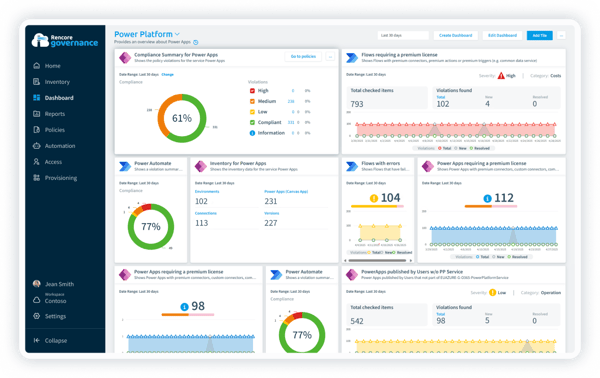
1. Gain full visibility into all flows running in your environment
You cannot govern what you cannot see. Start with a complete inventory of all Power Automate cloud and desktop flows across every environment in your tenant. This is your governance baseline. Everything else starts here.
For each flow, you want to know:
- Who owns it
- When it was last run
- Which connectors does it use
- Whether it is active
Rencore Governance gives you that tenant-wide inventory out of the box, without manual data collection or spreadsheet maintenance.
Why it matters: Shadow flows that nobody tracks are the source of most data security incidents and compliance surprises in Power Automate environments.
2. Discover and remove redundant flows
As Power Automate usage grows, so does flow sprawl. Users create flows to solve a problem, stop using them, and move on. The flows keep running or sit dormant without anyone noticing.
Look for:
- Flows with no recent run history
- Flows that stalled somewhere in the development process and were never enabled
- Flows that duplicate logic already covered elsewhere
Rencore Governance flags inactive and redundant flows automatically, so your team can clean up without having to manually review hundreds of entries.
Why it matters: Redundant flows add noise to your environment, complicate audits, and accumulate real costs if they use premium connectors or consume message credits.
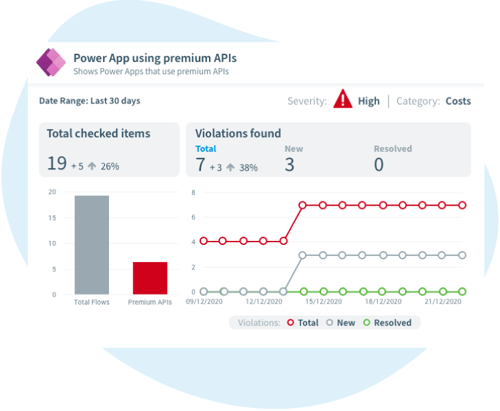
3. Discover flows with premium connectors
Premium connectors generate licensing costs. Each user whose flow uses a premium connector needs either a per-user Power Automate Premium license or a per-flow plan. Without visibility into which flows use them, you cannot accurately track licensing costs or spot users running flows outside their licensed scope.
Rencore Governance surfaces premium connector usage across your tenant, so you can align costs with actual business value and eliminate unnecessary spend.
Why it matters: Unmanaged premium connector usage is a leading cause of unexpected licensing overspend in Microsoft 365 environments.
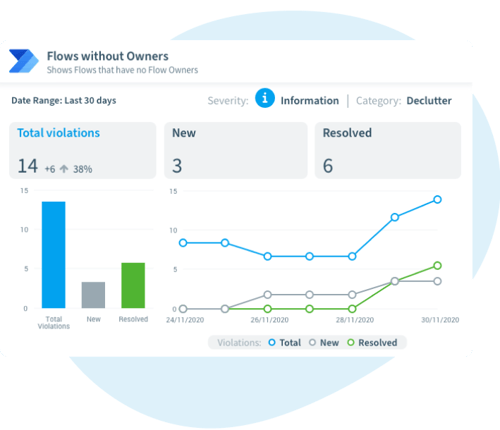
4. Discover flows without owners or with only one owner
Ownerless flows are an accountability gap and a potential compliance violation. Flows where the owner account has been disabled or deleted may still be running with nobody reviewing them. The same risk applies to heavily used flows with a single active owner: if that person leaves, the flow breaks silently until a key process stops working.
The fix is straightforward: For every business-critical flow, require at least two owners:
- The primary owner
- A service account or shared account that will remain valid if the primary owner leaves
Rencore Governance identifies both ownership gaps and single-owner risks across your tenant and surfaces them in a single report that your team can act on directly, making user offboarding a routine process rather than a governance emergency.
Why it matters: Orphaned and single-owner flows are common sources of access control failures, GDPR compliance gaps, and broken automations that are discovered only during audits.
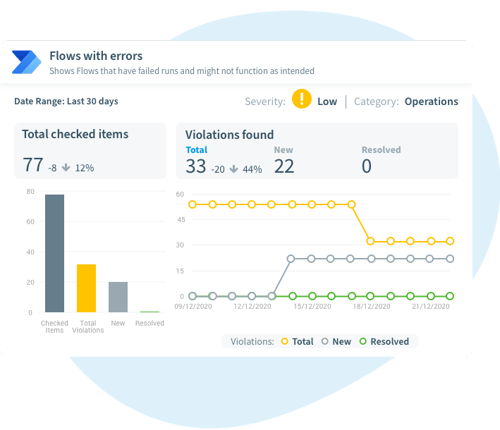
5. Discover heavily used flows or flows with errors across your company
Flows with high usage run under the owner's permissions. If the owner has broad access to sensitive SharePoint sites or personal data, the flow automatically inherits and exercises that access at scale. High-usage flows deserve the same scrutiny during access reviews and error reporting as any service account with elevated permissions.
Rencore Governance highlights high-volume or broken flows so your security team can review them during your regular access review cycle.
Why it matters: Flows running at scale under broad permissions are a GDPR risk surface that most organizations do not have on their radar. Heavily used flows with errors quickly become a business risk.
6. Discover flows sending or sharing data outside the organization
Data leaving the organization via automated flows is rarely malicious. Users are solving productivity problems: saving files to personal cloud storage, forwarding items to a personal email, and posting data to an external webhook. DLP policies block some of these patterns at the connector level, but they cannot catch everything, especially HTTP actions and custom connectors.
Rencore Governance helps you identify flows that connect to external services, so you can review them against your data-handling policies before they become a compliance issue.
Why it matters: Automated flows can move data at high volume without any visible user action, making them a significant risk to GDPR and IP protection if left unmonitored.
How does Power Automate impact your organization's Copilot readiness?
Microsoft 365 Copilot works with the data in your tenant. It reads SharePoint files, emails, Teams messages, and content written by Power Automate flows. That is what makes it powerful. It is also what makes ungoverned automation a direct risk to Copilot readiness.
If a flow is writing stale, duplicated, or unclassified data to SharePoint, Copilot will use that data. If flows pull content from external sources into M365 without sensitivity labels, that content becomes part of Copilot's knowledge base with no quality control.
Before extending Copilot access broadly, audit your Power Automate environment. Flows that introduce outdated or unclassified content need to be remediated first. Power Platform governance and Copilot readiness are not two separate workstreams. They are the same problem.
Power Automate best practices keep your M365 environment secure and Copilot-ready
Power Automate will continue to grow in your organization. That is a good thing. But governance cannot be an afterthought. The longer you wait, the more ungoverned flows accumulate, the larger the ownership gaps become, and the harder it is to demonstrate compliance when an audit lands.
The organizations that get this right treat Power Automate governance as a continuous process, not a one-time cleanup. Full-flow visibility, regular ownership reviews, and DLP policies integrated into a broader Copilot readiness program are what separate proactive teams from reactive ones.
Rencore Governance gives you the tenant-wide visibility, ownership gap detection, and policy enforcement to stay ahead of the governance debt.
Explore Rencore's Power Platform governance capabilities.